
Asp.Net Framework webapi2 文件上傳與下載 前端界面采用Ajax的方式執行
一、項目結構
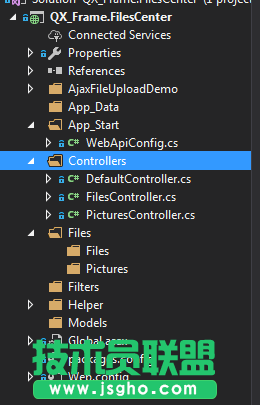
1.App_Start配置了跨域訪問,以免請求時候因跨域問題不能提交。具體的跨域配置方式如下,了解的朋友請自行略過。
跨域配置:NewGet安裝dll Microsofg.AspNet.Cors
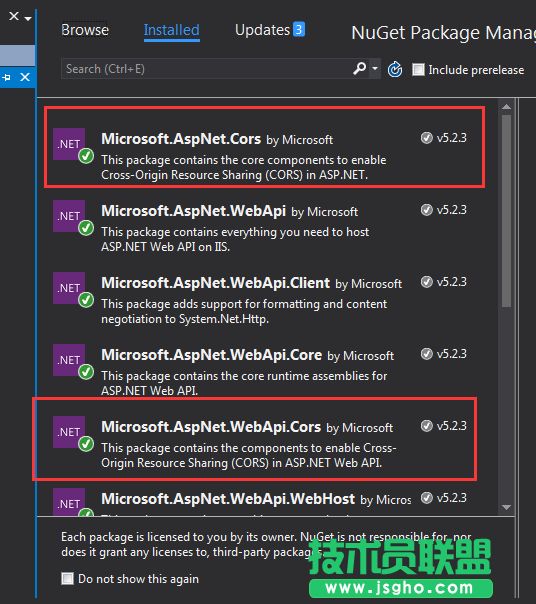
然后在App_Start 文件夾下的WebApiConfig.cs中寫入跨域配置代碼。
public static class WebApiConfig { public static void Register(HttpConfiguration config) { // Web API configuration and services // Web API routes config.MapHttpAttributeRoutes(); // Web API configuration and services //跨域配置 //need reference from nuget config.EnableCors(new EnableCorsAttribute("*", "*", "*")); config.Routes.MapHttpRoute( name: "DefaultApi", routeTemplate: "api/{controller}/{id}", defaults: new { id = RouteParameter.Optional } ); //if config the global filter input there need not write the attributes //config.Filters.Add(new App.WebApi.Filters.ExceptionAttribute_DG()); } }
跨域就算完成了,請自行測試。
2.新建兩個控制器,一個PicturesController.cs,一個FilesController.cs當然圖片也是文件,這里圖片和文件以不同的方式處理的,因為圖片的方式文件上傳沒有成功,所以另尋他路,如果在座的有更好的方式,請不吝賜教!
二、項目代碼
1.我們先說圖片上傳、下載控制器接口,這里其實沒什么好說的,就一個Get獲取文件,參數是文件全名;Post上傳文件;直接上代碼。
using QX_Frame.App.WebApi; using QX_Frame.FilesCenter.Helper; using QX_Frame.Helper_DG; using QX_Frame.Helper_DG.Extends; using System; using System.Collections.Generic; using System.Diagnostics; using System.IO; using System.Linq; using System.Net; using System.Net.Http; using System.Net.Http.Headers; using System.Text; using System.Threading.Tasks; using System.Web.Http; /** * author:qixiao * create:2017-5-26 16:54:46 * */ namespace QX_Frame.FilesCenter.Controllers { public class PicturesController : WebApiControllerBase { //Get : api/Pictures public HttpResponseMessage Get(string fileName) { HttpResponseMessage result = null; DirectoryInfo directoryInfo = new DirectoryInfo(IO_Helper_DG.RootPath_MVC + @"Files/Pictures"); FileInfo foundFileInfo = directoryInfo.GetFiles().Where(x => x.Name == fileName).FirstOrDefault(); if (foundFileInfo != null) { FileStream fs = new FileStream(foundFileInfo.FullName, FileMode.Open); result = new HttpResponseMessage(HttpStatusCode.OK); result.Content = new StreamContent(fs); result.Content.Headers.ContentType = new System.Net.Http.Headers.MediaTypeHeaderValue("application/octet-stream"); result.Content.Headers.ContentDisposition = new ContentDispositionHeaderValue("attachment"); result.Content.Headers.ContentDisposition.FileName = foundFileInfo.Name; } else { result = new HttpResponseMessage(HttpStatusCode.NotFound); } return result; } //POST : api/Pictures public async Task<IHttpActionResult> Post() { if (!Request.Content.IsMimeMultipartContent()) { throw new Exception_DG("unsupported media type", 2005); } string root = IO_Helper_DG.RootPath_MVC; IO_Helper_DG.CreateDirectoryIfNotExist(root + "/temp"); var provider = new MultipartFormDataStreamProvider(root + "/temp"); // Read the form data. await Request.Content.ReadAsMultipartAsync(provider); List<string> fileNameList = new List<string>(); StringBuilder sb = new StringBuilder(); long fileTotalSize = 0; int fileIndex = 1; // This illustrates how to get the file names. foreach (MultipartFileData file in provider.FileData) { //new folder string newRoot = root + @"Files/Pictures"; IO_Helper_DG.CreateDirectoryIfNotExist(newRoot); if (File.Exists(file.LocalFileName)) { //new fileName string fileName = file.Headers.ContentDisposition.FileName.Substring(1, file.Headers.ContentDisposition.FileName.Length - 2); string newFileName = Guid.NewGuid() + "." + fileName.Split('.')[1]; string newFullFileName = newRoot + "/" + newFileName; fileNameList.Add($"Files/Pictures/{newFileName}"); FileInfo fileInfo = new FileInfo(file.LocalFileName); fileTotalSize += fileInfo.Length; sb.Append($" #{fileIndex} Uploaded file: {newFileName} ({ fileInfo.Length} bytes)"); fileIndex++; File.Move(file.LocalFileName, newFullFileName); Trace.WriteLine("1 file copied , filePath=" + newFullFileName); } } return Json(Return_Helper.Success_Msg_Data_DCount_HttpCode($"{fileNameList.Count} file(s) /{fileTotalSize} bytes uploaded successfully! Details -> {sb.ToString()}", fileNameList, fileNameList.Count)); } } }
里面可能有部分代碼在Helper幫助類里面寫的,其實也僅僅是獲取服務器根路徑和如果判斷文件夾不存在則創建目錄,這兩個代碼的實現如下: