
ZKEACMS Core 是基于 .net core 開發(fā)的,可以在 windows, linux, mac 上跨平臺運行,接下來我們來看看如何在 CentOS 上運行 ZKEACMS。
安裝 .Net Core 運行時
運行以下命令,安裝 .Net Core Runtime
sudo yum install libunwind libicu curl -sSL -o dotnet.tar.gz https://go.microsoft.com/fwlink/?linkid=843420 sudo mkdir -p /opt/dotnet && sudo tar zxf dotnet.tar.gz -C /opt/dotnet sudo ln -s /opt/dotnet/dotnet /usr/local/bin
安裝 Nginx
sudo yum install epel-release sudo yum install nginx sudo systemctl enable nginx
修改 Nginx 的配置
修改 Nginx 的配置,讓它反向代理到 localhost:5000,修改全局配置文件 /etc/nginx/nginx.conf ,修改 location 結(jié)點為以下內(nèi)容
location / { proxy_pass :5000; proxy_http_version 1.1; proxy_set_header Upgrade $http_upgrade; proxy_set_header Connection keep-alive; proxy_set_header Host $host; proxy_cache_bypass $http_upgrade; }
啟動 Nginx
sudo systemctl start nginx
到這里,我們的環(huán)境就搭配好了,接下來,我們來發(fā)布 ZKEACMS
發(fā)布 ZKEACMS.Core
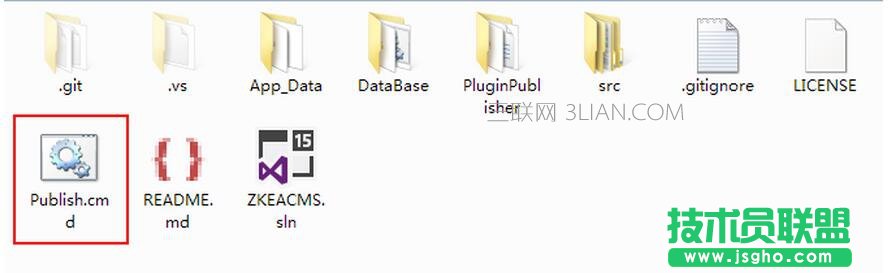
發(fā)布 ZKEACMS.Core 比較簡單,雙擊 Publish.cmd 即可
數(shù)據(jù)庫 SQLite
為了簡單起起見,這里使用 SQLite 作為數(shù)據(jù)庫,生成一個SQLite數(shù)據(jù)命名為 Database.sqlite。在發(fā)布好的程序文件夾下,創(chuàng)建 App_Data 文件夾,并將 Database.sqlite 放入 App_Data 目錄下。關(guān)于如何生成 SQLite 數(shù)據(jù),可以進群詢問,或者自行百度/谷歌。
修改連接字符串
打開 appsettings.json,加入 SQLite 的數(shù)據(jù)庫連接字符串,結(jié)果如下
{ "ConnectionStrings": { "DefaultConnection": "", "Sqlite": "Data Source=App_Data/Database.sqlite", "MySql": "" }, "ApplicationInsights": { "InstrumentationKey": "" }, "Logging": { "IncludeScopes": false, "LogLevel": { "Default": "Debug", "System": "Information", "Microsoft": "Information" } }, "Culture": "zh-CN" }
打包上傳服務(wù)器
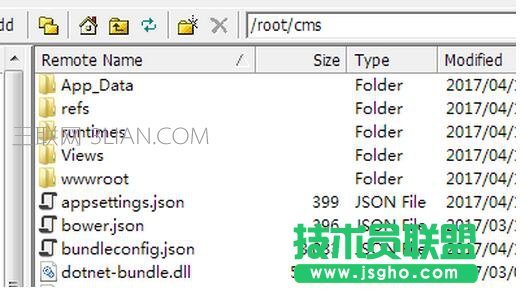
我們將發(fā)布好的程序打包為 cms.zip 并上傳到 /root 目錄下。并解壓到 /root/cms 目錄下,使用以下命令解壓
unzip cms.zip -d cms
運行
定位到目錄,然后使用 dotnet 命令運行
cd /root/cms dotnet ZKEACMS.WebHost.dll
運行成功以后,就可以使用您服務(wù)器的IP或者域名訪問了 :)
退出SSH遠程連接客戶端后,發(fā)現(xiàn)訪問不了,這是因為 dotnet 也退出了。
以服務(wù)方式運行
創(chuàng)建一個服務(wù),讓 dotnet 在后臺運行。安裝 nano 編輯器
yum install nano
創(chuàng)建服務(wù)
sudo nano /etc/systemd/system/zkeacms.service
輸入以下內(nèi)容保存
[Unit] Description=ZKEACMS [Service] WorkingDirectory=http://www.3lian.com/root/cms ExecStart=http://www.3lian.com/usr/local/bin/dotnet /root/cms/ZKEACMS.WebHost.dll Restart=always RestartSec=10 SyslogIdentifier=zkeacms User=root Environment=ASPNETCORE_ENVIRONMENT=Production [Install] WantedBy=multi-user.target
啟動服務(wù)
systemctl start zkeacms.service
這樣就可以安心的退出SSH遠程連接了。